How to play RealTT: controls, serving and first steps
RealTT has three game modes. In Beginner the game moves you to the ball and you just tap HIT; in Intermediate you step in and out and pick forehand or backhand; in Advanced your left thumb moves the player and your right thumb touches the racket square and swipes, so bat angle, aim and spin are all yours.
In this article
RealTT is a free table tennis (ping pong) game built for your thumbs on a phone screen. The idea is simple: the ball follows real physics, and points are decided by your timing, your position and the spin you put on the ball, not by luck. Right now you can play in your browser at real-tt.com, and the Android and iOS apps are coming soon.
This guide shows how to play RealTT from scratch: your first day in the game, the three control modes, how to hit and serve, and where to practice before you take on real people.
Your first day: Uncle Zé's garage
The first time you open the game, after picking your player name, your first day at the club begins. It is a short session, about 4 minutes, in the garage of Uncle Zé, the first rival of Story mode:
- You learn the serve: tap the opponent's side to place the ring, then serve.
- You play a little in each of the three game modes and pick yours. Uncle Zé suggests one, but the choice is yours.
- You build your first racket by picking one rubber for the forehand and one for the backhand.
- You play the "christening" of your new racket against Uncle Zé, with no tutorial.
If you already know how to play, tap I already play: skip the training. To understand the rubber choice, see how to build your racket in RealTT.
The three game modes
RealTT has three ways to play. They change how much the game does for you and how much power your shots can have:
| Mode | Movement | Hitting | Max power |
|---|---|---|---|
| Beginner | You walk to the ball by yourself | One button, HIT, no spin of your own | 50% |
| Intermediate | Sideways is automatic; you step in for short balls and back for deep ones | BACKHAND and FOREHAND buttons; the bat reads the spin and tilts itself | 65% |
| Advanced | Free movement with your left thumb | The full pad: bat angle, aim and spin are yours | 100% |
You can switch modes any time in Settings > Game mode, and from the pause menu, even in the middle of a match. Ranked is played in Advanced mode only, at full speed. For more on each control, see the controls help page.
How to hit in Advanced mode
In Advanced mode, the right side of the screen has a square that is your racket. The black half, on the left, is your backhand. The red half, on the right, is your forehand, the same colors as a real ping pong paddle.
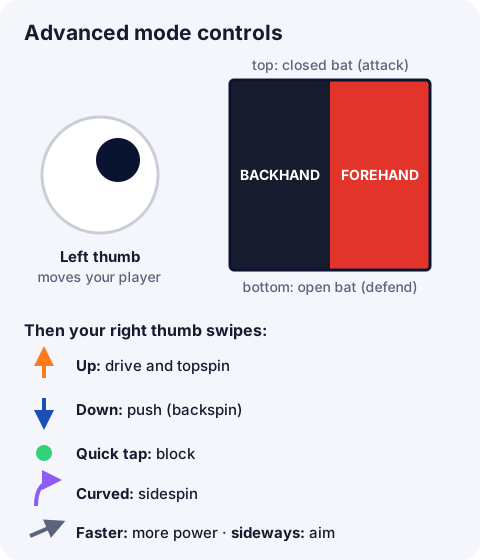
Where you touch inside each half changes the bat angle:
- Top of the square: a closed bat, the attacking position. This is where topspin comes from.
- Bottom: an open bat, the defensive position, for returning backspin.
- Left or right: the bat face turns and changes the direction of the ball.
After touching, you swipe. Swipe up for a drive or topspin loop; the faster the swipe, the harder the shot. Swipe down, gently, for a push. A quick tap with no swipe is a block. A curved swipe brushes the side of the ball and adds sidespin. It is the same logic as real table tennis, which we explain in table tennis spin.
Your left thumb, on the left half of the screen, works like a joystick: drag toward the ball to move. Your player speeds up and slows down, so getting into position early matters.
How to serve
Serving in RealTT follows the official rules: each player serves 2 points in a row, and at 10-10 the serve alternates every point. A serve that clips the net and lands correctly is a let and is replayed.
- In Advanced mode: tap the opponent's side of the table to move the ring; that is where the ball will land, and the dots show the flight. Then touch the square to pick the spin (top for topspin, bottom for backspin, the sides for sidespin) and swipe up to serve.
- In Beginner and Intermediate: place the ring the same way and tap SERVE. Here the serve has no spin of its own.
The ring and your timing
As the ball comes toward you, a ring appears under your bat. The tutorial tip says it all: swipe when the ball reaches the ring. The ring lights up when a clean hit is on. If it turns violet, you can still reach the ball, but it will be a stretch.
Every shot gets a grade on screen: PERFECT (on time and in the right spot), GOOD (on time, but off the sweet spot), EARLY, LATE or Stretch. Next to it you see the ball speed in km/h and its spin in rpm. Want to know why timing matters so much? Read RealTT physics.
Where to practice before it counts
The home screen has two shortcuts for practice, and neither one uses energy:
- Rally practice: a bot that never misses. You choose the power, the spin and where it sends the ball, and the game counts your longest rally.
- Training: matches against bots at three levels (Beginner, Club and Pro). They do not count for ranking, but they give coins and experience.
In Settings you can also turn visual helpers on or off, like Show ball spin (the color of the ball's trail shows the type of spin), Bounce marker and Forehand / backhand areas.
Frequently asked questions
Is RealTT free?
Yes. The game is free to play, and today you can play it right in your browser at real-tt.com. The Android and iOS apps are coming soon.
Which game mode should I start with?
If you are new, start in Beginner to get the rhythm of the ball. Once your timing feels easy, move to Intermediate and then Advanced, which is the Ranked mode.
How do I hit topspin in RealTT?
In Advanced mode, touch the top of the square (closed bat) and swipe up fast as the ball reaches the ring.
How do I return a backspin ball?
Touch the bottom of the square (open bat) and swipe gently down to push it back, or swipe up and brush the ball to lift it with topspin.
Can I play RealTT on a computer?
Yes. In a desktop browser, the mouse works as your finger and the keyboard moves your player (WASD or the arrow keys).