RealTT controls: how to hit, serve and add spin
RealTT has three control modes. In Beginner you move automatically and hit with one button; in Intermediate you pick forehand or backhand; in Advanced you move with your left thumb and hit by swiping on the square on the right as the ball reaches the ring.
How you control RealTT depends on your game mode. You pick it during the first training session with Uncle Zé and can switch any time in Settings › Game mode or from the pause menu.
The three game modes
| Mode | Movement | How you hit |
|---|---|---|
| Beginner | Automatic | One button, HIT. Forehand or backhand is picked for you |
| Intermediate | Forward and back | Two buttons, BACKHAND and FOREHAND. The bat reads incoming spin and tilts itself |
| Advanced | Free | The full pad: side, bat angle, aim and your own spin with the swipe |
The higher the mode, the harder it is to play and the harder you hit. Ranked is played in Advanced mode only, at full speed.
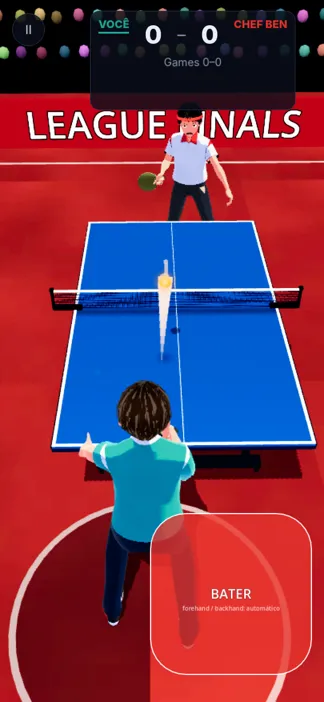
How to hit in Advanced mode
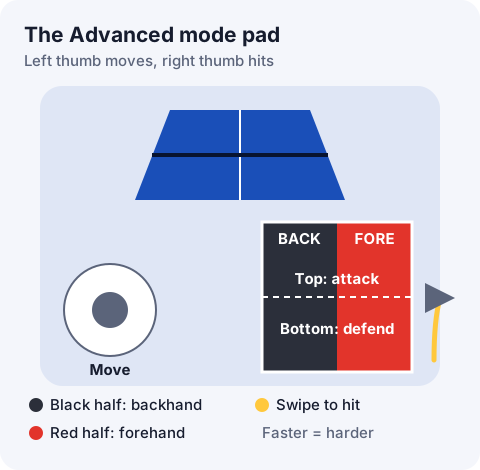
- Use your left thumb to move your athlete to the ball.
- With your right thumb, touch the square: the black half (BACK) is your backhand and the red half (FORE) your forehand.
- Pick the height: the top is attack, with a closed bat. The bottom is defense, with an open bat.
- Swipe up when the ball reaches the ring under your bat. A faster swipe hits harder.
After each shot, the game rates your timing: EARLY, PERFECT or LATE.
- Topspin: touch the top of the square and swipe up fast. The ball dips and kicks forward.
- Backspin ball: touch the bottom and swipe gently down. That push sends the backspin back.
How to serve
Touch your opponent's half of the table to move the ring: that's where the serve lands. The dots show the ball's flight.
- Beginner and Intermediate: after aiming, tap SERVE.
- Advanced: pick the spin on the square (top for topspin, bottom for backspin, sides for sidespin) and swipe up to serve.
The serve has to bounce on your side first. If it clips the net and lands in, you serve again.
On-screen helpers
In Settings, under Game, you can switch on or off: Show ball spin, Bounce marker, Forehand / backhand areas, Sound, Vibration and 120 fps (smoother, uses more battery).
Frequently asked questions
Which game mode should I choose?
Start where you feel comfortable. Beginner teaches the rhythm; once your timing is easy, move up to Intermediate and then Advanced.
How do I change the game mode?
In Settings › Game mode, or from the pause menu during a match.
Why can't I put spin on the ball?
Only Advanced mode has your own spin. In the other modes you hit flat.
My shots are always late. What should I do?
Swipe when the ball reaches the ring under your bat. In online matches a weak connection also delays the ball: see connection and performance.