How to delete your RealTT account and your data
In the app, open Settings, tap Delete account, type your player name and tap Delete forever. Deletion is immediate and can't be undone. If you can't sign in, email privacidade@real-tt.com from your account's address.
In this article
You can delete your RealTT account whenever you want, right in the app. Before you do, know what disappears and what you have to handle separately, like cancelling the Pass in the store.
How to delete it in the app
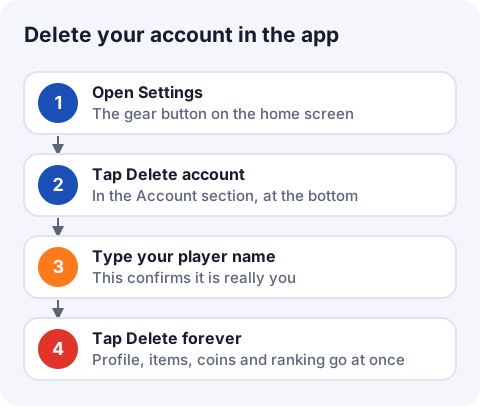
- On the home screen, tap the gear button to open Settings.
- Scroll to the Account section and tap Delete account.
- Read the warning and type your player name exactly as it appears. The button only unlocks with the right name.
- Tap Delete forever. If you change your mind before that, tap Keep my account.
When it's done, you'll see "Account deleted" and the game goes back to the sign-in screen.
What gets deleted
Deletion is immediate and removes:
- your profile, name and athlete's look;
- backpack items, coins and Bolas de Ouro;
- ranked, your leaderboard spot and match history;
- friends, your friend code, blocks and any items you had listed in the Market.
It can't be undone. Coins, Bolas de Ouro and items are not refunded.
If you can't sign in to the app
Email privacidade@real-tt.com from your account's email address, or tell us your player name, and ask for deletion. The account is deleted within 30 days.
What happens to your data afterwards
Under the Privacy Policy, after deletion your data is erased or anonymized within 30 days. The exception is what the law requires us to keep: access logs for 6 months and purchase records for the tax period.
Signing out is not the same as deleting. With Settings › Sign out, nothing is erased and you can sign back in any time.
Frequently asked questions
Can I recover a deleted RealTT account?
No. Deleting in the app is immediate and permanent. If you just want a break, use Sign out.
Does deleting my account cancel the Pass?
No. The subscription belongs to Google Play or the App Store. Cancel it there too.
Do I get my purchases back?
No. Coins, Bolas de Ouro and items aren't refunded when an account is deleted, unless the law requires it.
How do I delete my account if I can't sign in?
Email privacidade@real-tt.com from your account's address or include your player name. It's done within 30 days.
Do inactive accounts get deleted?
The Terms of Use allow closing accounts inactive for more than 24 months, with email notice when possible.