Purchases and refunds in RealTT
RealTT purchases go through Google Play or the App Store and are tied to your game account. If a purchase doesn't show up, reopen the Shop; if it's still missing, email suporte@real-tt.com. Refunds are requested from the store you paid.
In this article
Everything you can buy with real money in RealTT is under Shop › Offers. Nothing has to be bought to play, and gear is never sold for money.
What you can buy
| Product | What it is |
|---|---|
| Bolas de Ouro packs | Your first purchase of each pack is doubled |
| Starter pack | A one-time, limited-time offer that appears from level 3: Bolas de Ouro, the Estreia kit and days of the Pass |
| Bolas Club | Bolas de Ouro at once, plus a little more on each day you claim, for 30 days |
| The Pass | Monthly or yearly subscription |
Prices are shown in the store, including tax. Players under 18 need permission from a parent or guardian, who is also responsible for purchases made on the account.
How a purchase reaches your account
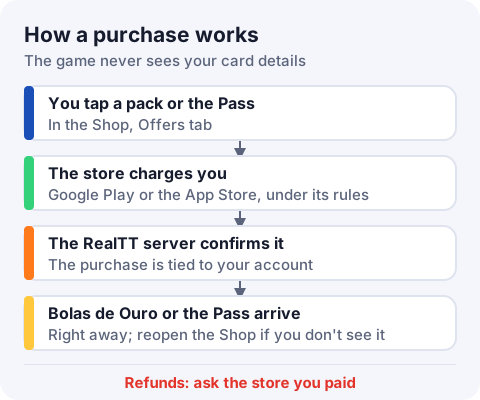
Google Play or the App Store charges you. Then the RealTT server confirms the purchase with the store and delivers it to your account. The game never sees your card details. When it works, you'll see a message like "+180 Bolas de Ouro" or "Pass active!".
I paid but didn't get it
- Close the Shop and open it again. The store's confirmation sometimes arrives a moment later.
- Make sure you're in the same RealTT account you bought with.
- If you saw "Could not confirm the purchase, try again", check your internet and open the Shop again.
- If it's still missing, email suporte@real-tt.com with your player name, the date and the order number from the store receipt.
If you see "Purchases are coming soon", purchases aren't available yet in the version of the game you're using, and nothing was charged.
How to request a refund
Refunds follow the policy of the store you paid and the law of your country, including statutory withdrawal rights where they apply.
- Google Play: request it from your Google Play order history, picking the RealTT purchase.
- App Store: request it at reportaproblem.apple.com, picking the RealTT purchase.
When a pack is refunded, its Bolas de Ouro are taken back from your account, up to the balance you still have. Content already used may be non-refundable where the law allows. Accounts deleted or banned for breaking the Terms of Use aren't refunded, unless the law requires it.
Frequently asked questions
I bought Bolas de Ouro and they didn't show up. What do I do?
Reopen the Shop and check you're in the right account. If they're still missing, email suporte@real-tt.com with the store's order number.
How do I get a refund for a RealTT purchase?
Through the store you paid: your Google Play order history, or reportaproblem.apple.com for Apple.
Does RealTT see my card details?
No. Payment is handled by the store. The game only gets the receipt: product, date and status.
Will my purchase disappear if I change phones?
No. It's tied to your RealTT account. Sign in with the same account on the new device.