Connection and performance in RealTT: lag, high ping and stutter
RealTT measures your ping before Ranked: green under 80 ms, yellow up to 150 ms, and red above that, when the ball may arrive late. Use Wi-Fi or a spot with better signal. If your internet drops during a live match, it counts as a loss.
In this article
RealTT's live matches (Ranked, Cups and Friends) run through the game server, which is in São Paulo, Brazil, and calls every point. That's why your internet connection matters.
What the signal bars mean
On the Ranked screen, under Find match, you'll see "Checking your connection…" and then the result, with your ping in milliseconds.
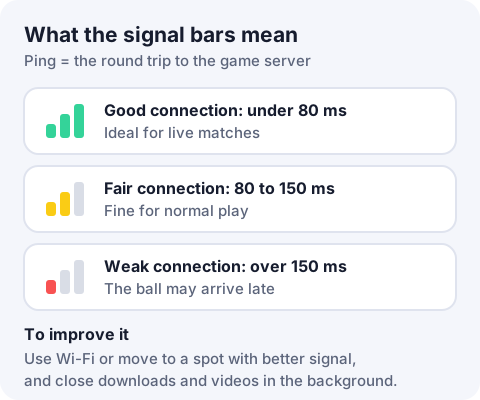
| Bars | Ping | What it means |
|---|---|---|
| Green: Connection: good | Under 80 ms | Ideal for live matches |
| Yellow: Connection: fair | 80 to 150 ms | Fine for normal play |
| Red: Connection: weak | Over 150 ms | "The ball may arrive late. Wi-Fi or a better signal helps." |
When searching for a ranked match, the game first tries to pair you with someone whose connection plus yours adds up well. If nobody turns up within a few seconds, it widens the search.
How to fix high ping and lag
- Switch from mobile data to stable Wi-Fi, or move somewhere with better signal.
- Get closer to your router and avoid crowded public networks.
- Pause downloads, video streams and calls on your phone and on other devices on the same network.
- Close RealTT and open it again before searching for a match.
If you play far from Brazil, expect a higher ping, because the server is in São Paulo.
My internet dropped mid-match
- Before the match starts (for example, on the accept screen): the match is cancelled and nobody is penalized. Cups are different: if you don't join your match, you lose by walkover.
- During a live match: leaving, closing the app or losing your connection counts as quitting. The win goes to your opponent, and 3 quits within 24 hours lock Ranked for a while. See reports and bans.
If you see "Could not connect to the game server", check your internet and try again in a few minutes.
The game stutters or my phone heats up
- In Settings, leave 120 fps off. It makes the game smoother but uses more battery.
- Close other open apps. Your phone's battery saver mode often limits game performance.
- In a browser, keep RealTT in a tab of its own.
If the problem continues, email suporte@real-tt.com with your phone model and what happens. See how to contact support.
Frequently asked questions
How do I fix high ping in RealTT?
Use Wi-Fi or a spot with better signal, pause downloads and videos, and reopen the game before searching for a match.
I lost my connection in Ranked. Does it count as a loss?
Yes. During the match, losing your connection counts as quitting and the win goes to your opponent.
Where is the RealTT server?
In São Paulo, Brazil.
Does RealTT work offline?
No. Your account, energy, drops and live matches all depend on the game server.