Reports, blocks and bans in RealTT
To report someone, open their profile, tap the ••• menu and choose Report, or use the Report button after the match. Reports can hide an offensive name or put Ranked under review, but a ban only happens after a person on the team reviews it.
In this article
RealTT has no free-text chat between players. What a player shows others is their name, their look and the way they play, and that's what can be reported.
How to report a player
- Open the player's profile and tap the ••• menu. Right after a live match, you can also tap Report on the result screen.
- Pick a reason: Cheating or bot, Offensive name, Abusive behaviour (quits or fixes results) or Something else.
- Leave Also block this player ticked if you want.
- Tap Send report.
False reports lower the weight of your next ones. Reports from very new accounts and repeat reports against the same player also count for less.
What happens next
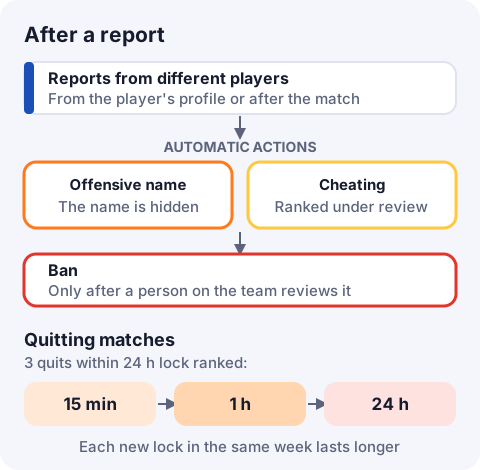
Nobody is banned automatically. The system only acts on its own in two cases, and only when different players report the same thing:
- Offensive name: the name is replaced with a generic one, like "Jogador1234", and the player has to pick a new one. A player whose name is hidden several times can't change it again for a while.
- Cheating: if the stats also look impossible for a human, that player's Ranked goes under review. They keep playing and earning coins, but their tier doesn't move, and they only meet other players under review.
A ban is always a decision made by a person on the team, after reviewing the reports.
Blocking a player
On the player's profile, tap ••• › Block. You stop getting friend requests and invites from each other, and the Ranked queue keeps you apart. To unblock, open Settings › Blocked players and tap Unblock.
Quitting matches
Leaving a live match partway counts as a loss. Quit 3 matches within 24 hours and Ranked is locked for a while: 15 minutes the first time, then 1 hour, then 24 hours if it happens again in the same week. Losing your connection mid-match also counts as leaving.
I was penalized. Now what?
The Terms of Use allow warnings, hidden names, frozen ranking, removed rewards, suspensions or bans for cheating, fixing results, using multiple accounts or an offensive name. To ask for a review, email suporte@real-tt.com with your player name and what happened.
Frequently asked questions
How do I report a player in RealTT?
Open their profile, tap ••• and choose Report, or tap Report on the match result screen.
Does the player find out I reported them?
The game doesn't show them who reported them.
My account was banned. How do I ask for a review?
Email suporte@real-tt.com with your player name and explain what happened.
My name was changed to "Jogador" and a number. Why?
It was hidden after reports from other players. The game asks you to pick a new name.
Why is Ranked locked?
You quit 3 matches within 24 hours. The lock ends on its own after a while.