How to create a RealTT account and sign in
On the first RealTT screen, tap Create account, enter your email and a password of at least 8 characters, then pick a player name of 3 to 16 characters. To come back later, use Sign in with e-mail with the same details.
Your account holds everything you earn in RealTT: coins, Bolas de Ouro, rackets, level, ranked and friends. Signing up takes less than a minute and it's free.
How to create your account
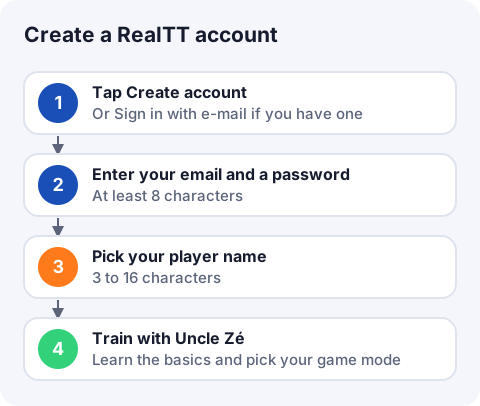
- Open RealTT and tap Create account.
- Enter your email, a Password of at least 8 characters, and type it again in Repeat the password. Tap Create account.
- On the "What should they call you at the table?" screen, type your player name and tap Start.
- Play the first training session with Uncle Zé. He teaches you to serve and hit, and helps you pick a game mode.
By continuing you accept the Terms of Use and the Privacy Policy, linked right on the sign-in screen. You must be 13 or older to play. If you are under 18, you need permission from a parent or guardian.
Player name rules
- 3 to 16 characters.
- Letters, numbers, dot, dash and underscore (_) only. Accented letters are fine.
- Offensive names are refused with "This name is not allowed".
Your name shows on the ranking and on your athlete's back. You can change it later: on the Equip tab, tap the pencil next to your name.
How to sign back in
Tap Sign in with e-mail, enter the same email and password, and tap Join. Some versions of the game also show a Continue with Google button. If you signed up with Google, always sign in with it.
| Message | What to do |
|---|---|
| Check the e-mail and password (min. 8 characters) | The email needs an @ and the password 8 or more characters |
| The passwords do not match | Type the same password in both fields |
| Wrong e-mail or password | Check for a stray space or a capital letter |
| That e-mail is already registered | The account exists: use Sign in with e-mail |
| Can't reach the server | Check your internet and try again |
To sign out, open Settings (the gear button on the home screen) and tap Sign out. Signing out deletes nothing: just sign in again.
Frequently asked questions
I forgot my RealTT password. What now?
The app doesn't have a password reset button yet. Email suporte@real-tt.com from your account's address and include your player name.
Can I play RealTT without an account?
No. You sign in with email and password or, where it shows, with Google. The account keeps your progress on the server.
What is the minimum age to play?
- Players aged 13 to 17 need a parent's or guardian's permission.
Can I have more than one account?
Accounts are personal. Using several accounts to boost ranking or referrals is against the Terms of Use.
How do I move my account to a new phone?
Sign in with the same email on the new device. See change phones.